Free Online Qwen Image Editor & AI Photo Edit
Transform, inpaint, and edit photos directly in your browser with Qwen Image Edit 2511 & 2512. No ComfyUI, no local setup, and zero GPU requirements.
Explore Qwen Image Tools
Discover specialized generators, guides, and comprehensive model benchmarks.
Qwen Image Generator
Generate photorealistic visuals, digital illustrations, and scenes from scratch with AI.
Try Generator →Prompt Guide & Library
Browse over 30 proven prompt formulas, typography recipes, and character consistency tips.
Read Formulas →vs Midjourney Comparison
Detailed benchmark comparing prompt understanding, typography spelling, and inpainting.
Compare Models →vs Flux Benchmark
In-depth analysis of image detail, VRAM requirements, and instruction adherence.
Read Analysis →How to Use the Online AI Editor
Edit and transform any visual in 3 intuitive steps without complex Photoshop layers.
Upload or Select Image
Drag and drop your photo, artwork, or product shot into the editor. You can also pick from ready-made presets to experiment instantly.
Enter Natural Language Edit Prompt
Describe what you want to change in simple English or Chinese: replace backgrounds, alter apparel, tweak lighting, or inpaint specific elements.
Preview, Compare & Download HD
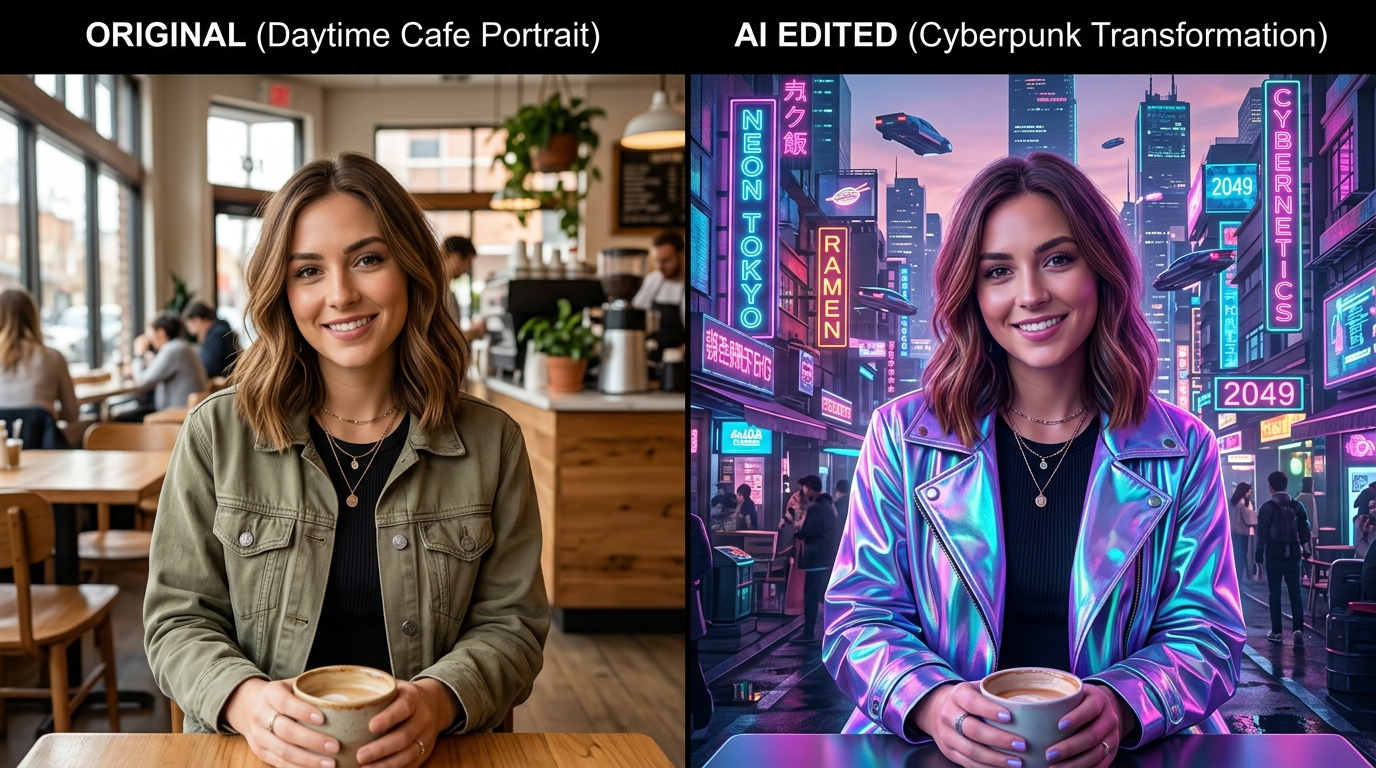
Inspect the Before-and-After results with the side-by-side viewer. Refine prompts with 1-click iterations and download high-resolution PNGs.
Key Features of Qwen Image Editor
Why creators, visual artists, and marketers choose this platform for next-generation visual manipulation.
Instruction Inpainting
Describe localized modifications with plain text prompts. The model automatically segments edit masks and harmonizes lighting, shadows, and edge grain.
Crisp Text & Typography
Render photorealistic English and Chinese typography on street banners, apparel, packaging, and digital advertisements without garbled characters.
Character & Face Consistency
Locks facial geometry, gaze vectors, and core character identity across sequential background changes, wardrobe replacements, and style shifts.
Cloud GPU Acceleration
Powered by high-throughput enterprise GPU clusters with FlashAttention, delivering fast rendering turnaround without consuming local computer memory.
Supported Qwen-Image-Edit Checkpoints
The Qwen-Image foundation family bridges visual multimodal understanding and generative diffusion. Our online editor integrates the official open-source weights optimized for high-fidelity execution.
Qwen-Image-Edit 2511
The acclaimed flagship revision for instruction-guided inpainting. Checkpoint 2511 excels at fine-grained edits, complex subject preservation, and photo-level material realism with minimal hallucination.
- Best for multi-object replacement & background swaps
- Sub-pixel edge blending and natural shadow cast
- Exceptional portrait feature retention
Qwen-Image-Edit 2512
Engineered for nuanced prompt comprehension, spatial camera transformations, and multi-turn modifications. Checkpoint 2512 accurately interprets conversational constraints and stylistic nuances.
- Camera perspective & angle adjustment
- Advanced aesthetic color grading & mood shifts
- Enhanced bilingual typography & packaging design
Qwen-Image-Edit 2509
The baseline architecture renowned for lightweight inference and rapid previewing. Provides dependable object removal, background clearing, and quick conceptual prototyping.
- Fast turnaround for rapid iterations
- Efficient object erasure & clean inpainting
- Stable baseline for standard resolution outputs
Online Web Studio vs Local ComfyUI Workflow
Many creators search for Qwen Image Edit ComfyUI workflows, GGUF quants, or HuggingFace nodes. Here is why using our cloud workspace saves hours of troubleshooting and expensive hardware costs.
Local ComfyUI / GGUF Workflow
Self-hosted local installation
- ✕Massive Hardware Requirement: Needs high-end GPUs with 16GB–24GB VRAM (e.g. RTX 4090) to prevent CUDA Out Of Memory (OOM) crashes.
- ✕Complex Setup: Requires Python virtual environments, PyTorch matching, custom nodes, git submodules, and constant dependency updates.
- ✕No Mobile Access: Tied strictly to your local desktop machine; impossible to use on iPads, phones, or thin laptops.
- ✕Large Download Footprint: 20GB+ checkpoint files consume huge storage and bandwidth.
Online Cloud Studio
Instant in-browser experience
- ✓Zero Hardware Barrier: Runs seamlessly on any computer, Chromebook, iPad, or smartphone without local GPU consumption.
- ✓Instant Start with 0 Setup: No drivers, no nodes, no terminal scripts. Upload photo, type prompt, and get results in seconds.
- ✓Always Latest Checkpoints: Automatically updated with Qwen-Image-Edit 2511, 2512, and continuous fine-tuning improvements.
- ✓Integrated Comparison & Storage: Built-in Side-by-Side before/after comparison tool, community showcase, and HD cloud history.
Mastering AI Photo Editing & Character Consistency
Overcoming common challenges in text-driven image modification with proven prompt structures and intelligent inpainting.
Fixing Face Drift & Inconsistency
A frequent issue with image generators is facial distortion during edits ("can't get faces correct"). In our web workspace, avoid broad re-generation prompts. Instead, specify targeted alterations like:
The model cross-references original face landmarks and preserves personal identity.
Atmospheric Relighting & Shadows
When changing daylight photos into sunset or neon cyberpunk scenes, legacy editors leave harsh edge artifacts. Qwen-Image-Edit calculates global illumination and accurately projects colored ambient bounce:
Seamlessly integrates subject and background into a unified photographic composition.
Flawless Graphic Text & Signage
Need to replace text on packaging, posters, or t-shirts? Use explicit quotation marks to instruct the Qwen vision decoder to render exact typography:
Generates sharp lettering without typical diffusion blur, gibberish, or missing vowels.
Frequently Asked Questions
Everything you need to know about the AI photo editing suite.